Message brokers
Why brokers are needed
Message brokers are an intermediate layer between services that accepts messages from some participants (producers) and delivers them to others (consumers), without making them aware of each other directly. Instead of a synchronous HTTP call, a service publishes an event and moves on, while the receiver processes it whenever it's ready.
The most popular ones are Kafka and RabbitMQ:
| Kafka | RabbitMQ | |
|---|---|---|
| Model | event log (partitions, offset) | queue (push, exchange/routing) |
| Message storage | durable, history can be replayed | message is deleted after acknowledgment |
| Ordering | guaranteed within a partition | guaranteed within a queue |
| Throughput | very high | medium |
| Typical use case | event streaming, analytics, audit | task queue, RPC, complex routing |
There are also other message brokers, such as:
- nats / nats jetstream — a lightweight broker; jetstream adds persistence and at-least-once delivery on top of plain nats;
- redis — can work in several modes:
pub/sub(fire-and-forget, no storage),streams(an append-only log with consumer groups, closer to Kafka), and lists (lists) as a homemade queue vialpush/brpop; - mqtt — a protocol for IoT and devices with unstable connectivity, a lightweight client, QoS levels instead of the full delivery guarantees the brokers above provide.
Danger
redis is not designed to be a message broker, so it can lose messages and also has scaling issues.
All of them offer different guarantees and are used for their own niche. Accordingly, each broker has its own libraries to work with it. But what do you do if you want a single API instead of memorizing the quirks of every library?
The community's choice
We suggest faststream — it gives a
unified API (broker.publish, @broker.subscriber) on top of Kafka,
RabbitMQ, NATS and Redis, so switching brokers mostly means swapping one
import. Kafka will be used in the examples, as the most widespread message
broker.
Publishing an event
from faststream.kafka import KafkaBroker

broker = KafkaBroker("localhost:29092")  # broker.start()/close() — in the app's lifespan
import dataclasses
import time
import uuid


@dataclasses.dataclass
class RefundRequestedEvent:
    event: str
    request_id: uuid.UUID
    account: str
    amount: float


REFUND_EVENTS_TOPIC = "refund-events"
import dataclasses
import uuid
from typing import NamedTuple

from heavyswag import HeavyRouter
from heavyswag.specify import Body, Request, Response

from broker import broker
from events import REFUND_EVENTS_TOPIC, RefundRequestedEvent

router = HeavyRouter("/")


class RefundDTO(NamedTuple):
    account: str
    amount: Body[float]


@router.post("/refund/{account}")
async def refund(_: Request, dto: RefundDTO) -> Response[None]:
    event = RefundRequestedEvent(  # (1)!
        event="refund.requested",
        request_id=uuid.uuid4(),
        account=dto.account,
        amount=dto.amount,
    )
    await broker.publish(dataclasses.asdict(event), topic=REFUND_EVENTS_TOPIC, key=dto.account.encode())  # (2)!
    return Response(status_code=202, body=None)
-
faststream serializes whatever you pass to it through pydantic, so the handler's DTO and the event sent to the broker are always two separate structures: the DTO stays a
NamedTuple, while the event is adataclass(or a pydantic model) that's explicitly turned into a dict. -
If losing the event isn't acceptable, publishing directly from the handler isn't the most reliable option: if the process crashes or Kafka becomes unavailable between the DB write and the
publishcall, the event is lost for good (the classic dual-write problem). For such cases theoutbox patternis used: the event is written to the same DB transaction as the business data, and a separate worker reads that table and publishes the events to the broker, retrying on failure.worker.py (outbox relay)async def relay_batch(session, broker) -> None: rows = await session.execute( select(outbox_events_table) .where(outbox_events_table.c.published_at.is_(None)) .with_for_update(skip_locked=True) .limit(100) ) for row in rows: await broker.publish(row.payload, topic=row.topic, key=row.key.encode()) await session.execute( update(outbox_events_table) .where(outbox_events_table.c.id == row.id) .values(published_at=func.now()) )
Consumer
Now let's write a consumer that receives the event. It's a separate process
with its own FastStream app — it has nothing to do with HeavySwag and runs
independently of the HTTP server:
import asyncio

from faststream import FastStream
from faststream.kafka import KafkaBroker

from events import REFUND_EVENTS_TOPIC, RefundRequestedEvent

broker = KafkaBroker("localhost:29092", client_id="refund-events-consumer")
app = FastStream(broker)


@broker.subscriber(REFUND_EVENTS_TOPIC, group_id="refund-events-consumer")
async def on_refund_requested(event: RefundRequestedEvent) -> None:
    print(f"refund requested: {event.request_id} account={event.account} amount={event.amount}")


if __name__ == "__main__":
    asyncio.run(app.run())
Creating the broker and wiring it into the app
The broker is created once per process (the broker.py module above) and
reused by all handlers through a plain import — no separate DI is needed.
Opening and closing the connection must happen strictly in the app's
lifespan, not in the handler itself:
from contextlib import asynccontextmanager

from heavyswag import HeavyRouter, HeavySwag, run_app

from broker import broker
from routes import router

@asynccontextmanager
async def lifespan(_: HeavySwag):
    await broker.start()  # (1)!

    yield None

    await broker.close()


app = HeavySwag(router, lifespan=lifespan)
asgi_app = run_app(app)
broker.start()beforeyieldandbroker.close()after — the connection lives for exactly as long as the app is accepting traffic, and closes gracefully when the server stops.
Infrastructure
For local development, a single Kafka container in KRaft mode (no Zookeeper) is enough, plus, optionally, a UI for browsing topics:
services:
  kafka:
    image: apache/kafka:3.8.0
    ports:
      - "29092:29092"
    environment:
      KAFKA_NODE_ID: 1
      KAFKA_PROCESS_ROLES: broker,controller
      KAFKA_LISTENERS: PLAINTEXT://:9092,CONTROLLER://:9093,PLAINTEXT_HOST://:29092
      KAFKA_ADVERTISED_LISTENERS: PLAINTEXT://kafka:9092,PLAINTEXT_HOST://localhost:29092
      KAFKA_LISTENER_SECURITY_PROTOCOL_MAP: CONTROLLER:PLAINTEXT,PLAINTEXT:PLAINTEXT,PLAINTEXT_HOST:PLAINTEXT
      KAFKA_CONTROLLER_LISTENER_NAMES: CONTROLLER
      KAFKA_CONTROLLER_QUORUM_VOTERS: 1@kafka:9093
      KAFKA_INTER_BROKER_LISTENER_NAME: PLAINTEXT
      KAFKA_OFFSETS_TOPIC_REPLICATION_FACTOR: 1
      CLUSTER_ID: MkU3OEVBNTcwNTJENDM2Qk
    healthcheck:
      test: ["CMD-SHELL", "/opt/kafka/bin/kafka-broker-api-versions.sh --bootstrap-server localhost:9092"]
      interval: 5s
      timeout: 5s
      retries: 15
      start_period: 15s

  kafka-ui:
    image: provectuslabs/kafka-ui:latest
    depends_on:
      - kafka
    environment:
      - KAFKA_CLUSTERS_0_NAME=local
      - KAFKA_CLUSTERS_0_BOOTSTRAPSERVERS=kafka:9092
    ports:
      - "8234:8080"
The app and consumer from the examples above connect to localhost:29092
(the port exposed from the container); inside the docker network, services
reach each other by the name kafka:9092.
Interactive documentation
faststream also has its own interactive documentation — based on the
declared @broker.subscriber/@broker.publisher, it generates an
AsyncAPI schema, which is the equivalent of
Swagger/OpenAPI, but for message brokers: what topics exist, what events
flow through them, and what their format is.
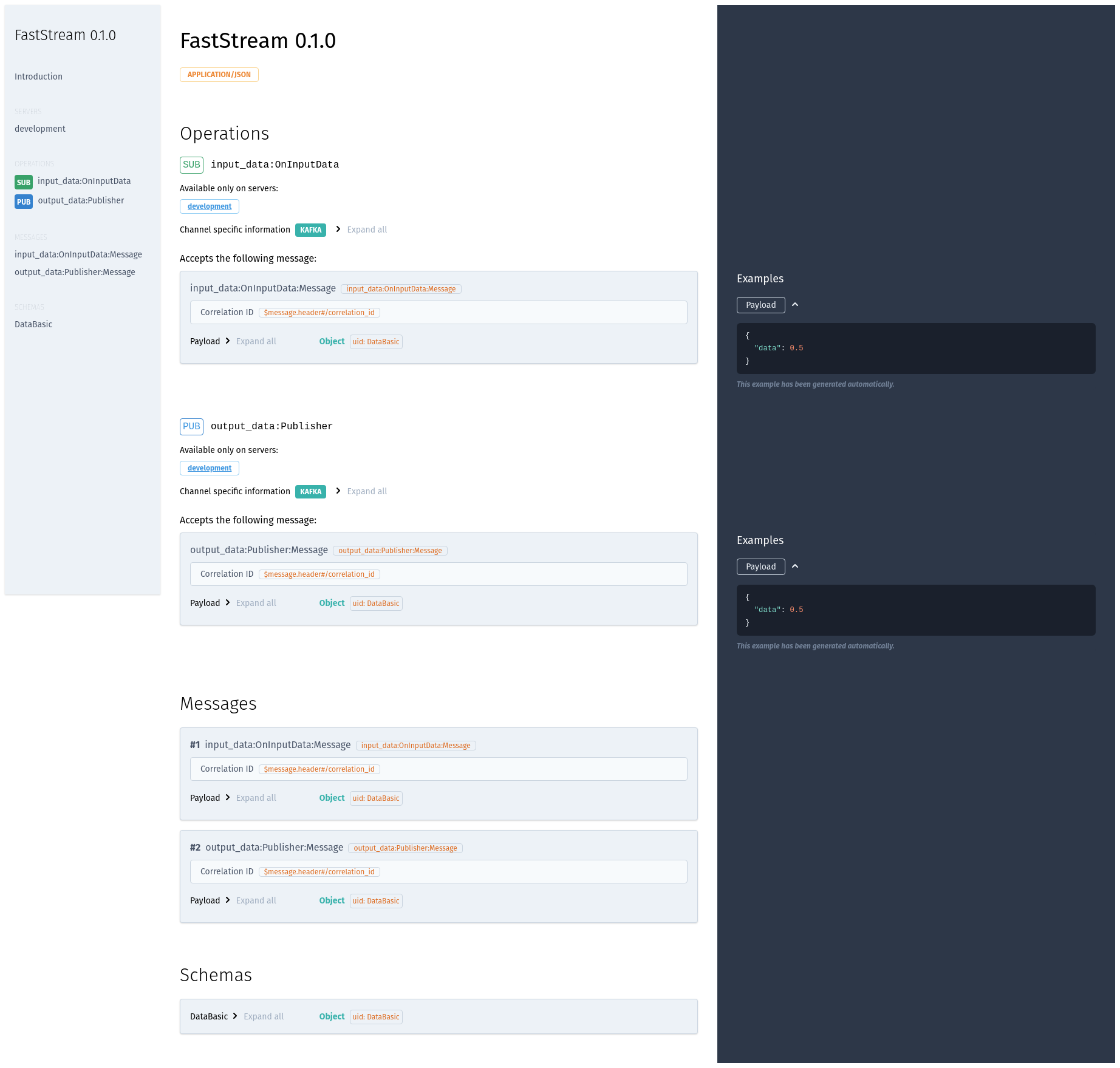 taken from the official faststream website
It's served with a separate command, alongside the app:
The broker address in the schema defaults to the value passed to
KafkaBroker(...) — if that's localhost or an internal docker host, it's
useless (and sometimes unsafe) for an external reader of the documentation.
It can be overridden explicitly, without touching the app's connection:
from faststream.kafka import KafkaBroker

broker = KafkaBroker(
    "localhost:29092",
    description="Kafka broker running locally",
    specification_url="kafka.staging.example.com:9092",  # (1)!
)
- This is exactly the address consumers of the generated documentation will see, regardless of what the process actually connects to.